

Need to set up WordPress before you can use WeaselWorks? No problem. It's much easier than it sounds, and you don't need to know anything technical.
In short: sign up with a web host, which sets up WordPress for you, then add WeaselWorks with a few clicks. Most people are done in about 20 minutes.
What Is WordPress?
WordPress is the most popular way to make a website, and it's free. Think of it like a house for your website: WordPress gives you the walls and the rooms, and you choose the furniture.
WeaselWorks is one piece of furniture you add. It turns your website into a home for your team's work, where everyone can see what needs doing and who's doing it.
Why Bother? You'll Save a Lot
Apps like monday.com and Asana charge for every person on your team, every month. With WeaselWorks you pay for one small website, however big your team gets.
A team of 10, for one year
Asana Starter ($10.99 per person a month) and monday.com Basic ($9 per person a month), billed yearly. WordPress hosting at a typical regular price, not an introductory deal; WeaselWorks Free costs nothing. Prices from each company's website, checked October 2026.
What You Need
Just two things, and you get both from the same company.
Hosting
A place to keep your website on the internet. Think of it as renting a small spot online.
A Domain
Your website's address, like yourbusiness.com. Hosts often include one free for the first year.
The good news: the hosts below install WordPress for you, so you can set up WordPress without anything technical.
Three Easy Steps to Set Up WordPress
1 Get Hosting (WordPress Included)
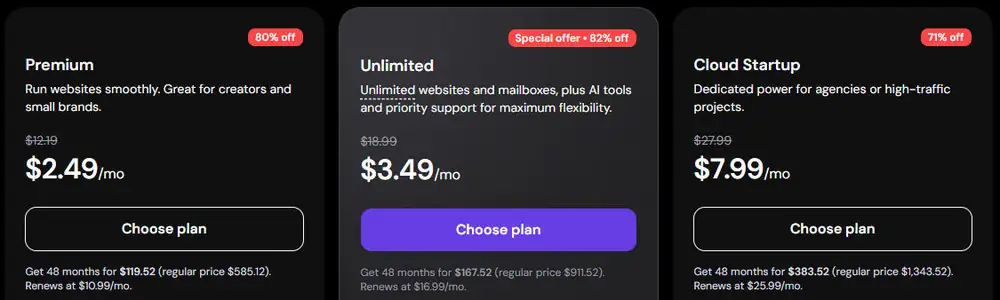
Pick one of these hosts and choose their basic plan. That's all a small team needs. You'll pick your website's address while you sign up.



These three are WordPress.org's own recommended hosts.
2 Open Your New Website
When sign-up finishes, your host shows a button to open WordPress. This is your website's control room. Bookmark it so you can find it again.
3 Add WeaselWorks
In WordPress, go to Plugins › Add New Plugin, click Upload Plugin, choose the WeaselWorks file, then click Install Now and Activate. Installing WeaselWorks has more detail.

That's it. WeaselWorks is ready for your team.
Watch out: WordPress.com is a different service from a WordPress website you host yourself. Its free and cheaper plans can't add plugins, so WeaselWorks won't work there. Choose one of the hosts above instead.
A Private Site Just for Your Team
Your WeaselWorks site doesn't have to be your company website, or a website anyone visits. Many teams set up a separate WordPress site that exists only to run WeaselWorks. It's a good fit when:
- your company website is run by IT or an outside agency
- your company website isn't built on WordPress
- you'd rather keep your team's work completely apart from your public site
You set it up the same way, with the three steps above. Give it an address of its own (hosts often include one free for the first year), and your company website is never touched. Any theme works, because WeaselWorks draws its own pages, so there's nothing to design.
Five Quick Settings for a Private Site
- Open straight to WeaselWorks: go to Settings › Reading, choose A static page, and pick your WeaselWorks Entry page (called "WW Entry" unless you renamed it) as the Homepage. Your site's address then shows the WeaselWorks sign-in, and people who are signed in go straight to their work.
- Keep it out of search results: on the same screen, tick Discourage search engines from indexing this site.
- Only people you add: in Settings › General, untick Anyone can register.
- Clear out the samples: delete WordPress's "Hello world!" post and "Sample Page". You won't need them.
- Say who to ask: in WeaselWorks › Organization Settings, add a contact email, so anyone without access knows who to ask.
Tip: if your team will attach private or confidential files, check File Protection once you're set up. Keeping Attached Files Private ›
Common Questions
Do I need to know any code?
No. The host sets WordPress up for you, and adding WeaselWorks takes a few clicks.
How long does it take to set up WordPress?
Most of the time is the host's sign-up. When that's done, WordPress is already installed, and adding WeaselWorks takes a few minutes more.
I already have a website. Can I use it?
Yes, if it runs on WordPress and you can add plugins to it. Or keep it separate with a private site just for your team (see above).
What does hosting cost?
Basic plans start at a few dollars a month. Check the regular price after the first term, too.
What's Next?
Once you set up WordPress and add WeaselWorks, follow our Get Started steps to create your team's first Workspace and invite everyone in.