
Project Management for WordPress
Your Projects. Your Website. Your Data.
WeaselWorks turns your WordPress site into a full project manager for your team: boards, tasks, timelines and charts. No per-person monthly fees, and everything stays on your own site.
Free forever. Works with the site you already have.
WeaselWorks FREE

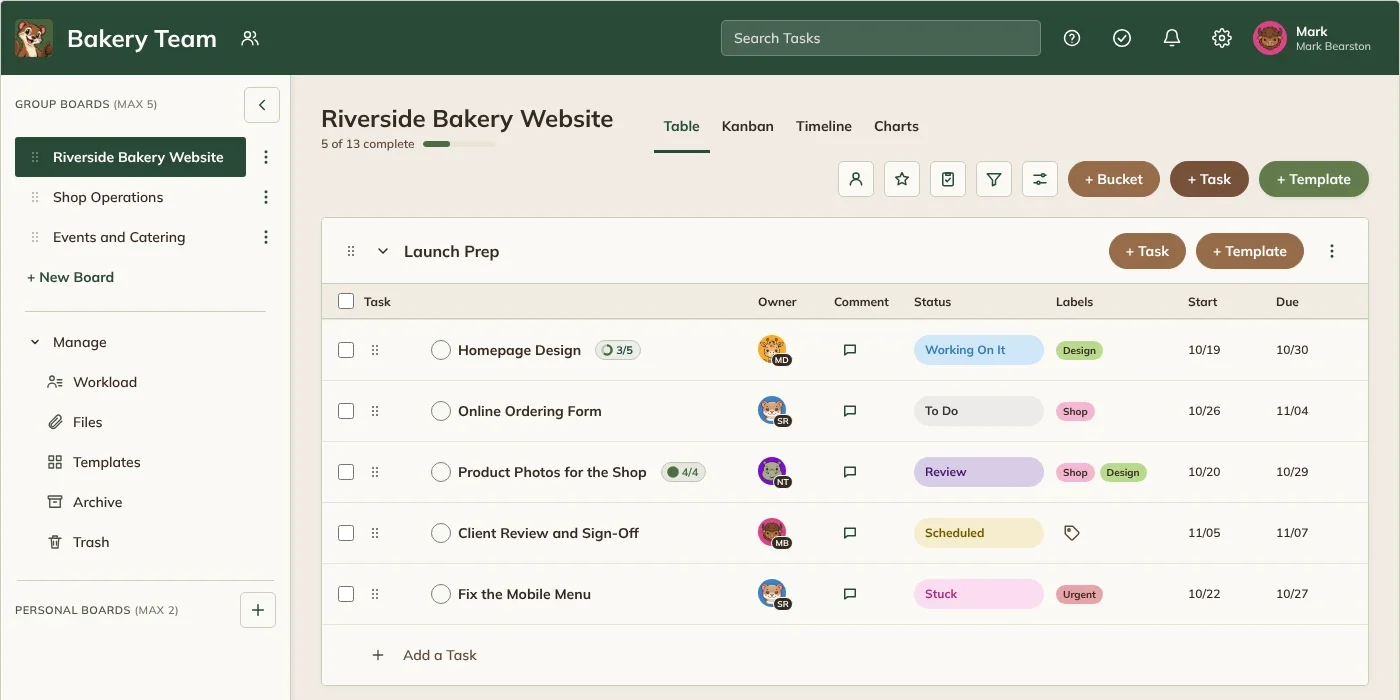
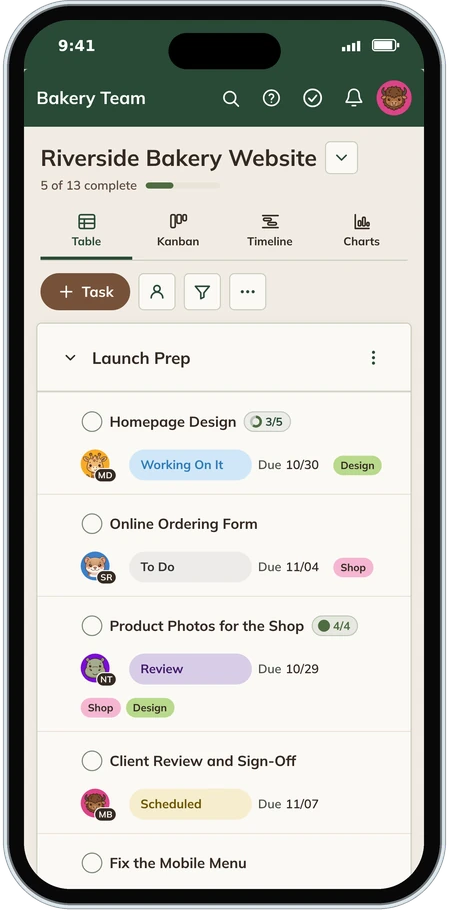
Everything Your Team Needs, Right Inside Your Website.
Pay Per Site, Not Per Person
Add your whole team, and everyone who joins later. WeaselWorks never charges per person, so a bigger team never means a bigger bill.
Your Data Stays Home
Tasks, comments, files and history live on your own website. Back it up or move it to another site whenever you like.
Works With Your Theme and Plugins
WeaselWorks runs on its own page and leaves your theme, login and other plugins alone.
Ready for Phones
A layout made for small screens, so your team can update tasks wherever the work is.
Four Great Ways
to See the Work
Same tasks, four views. Switch with one click.

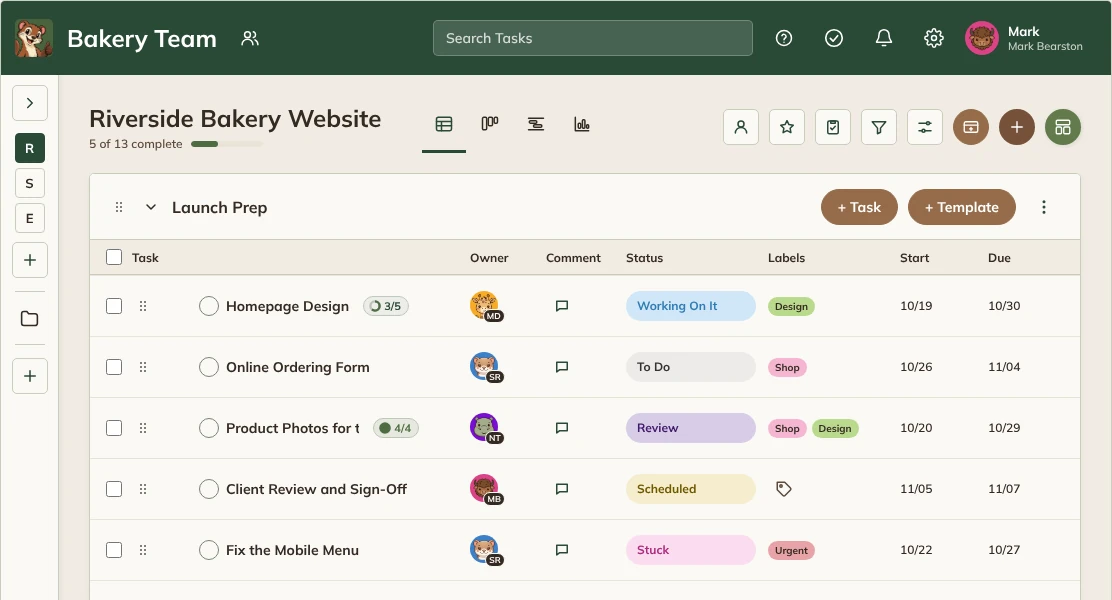
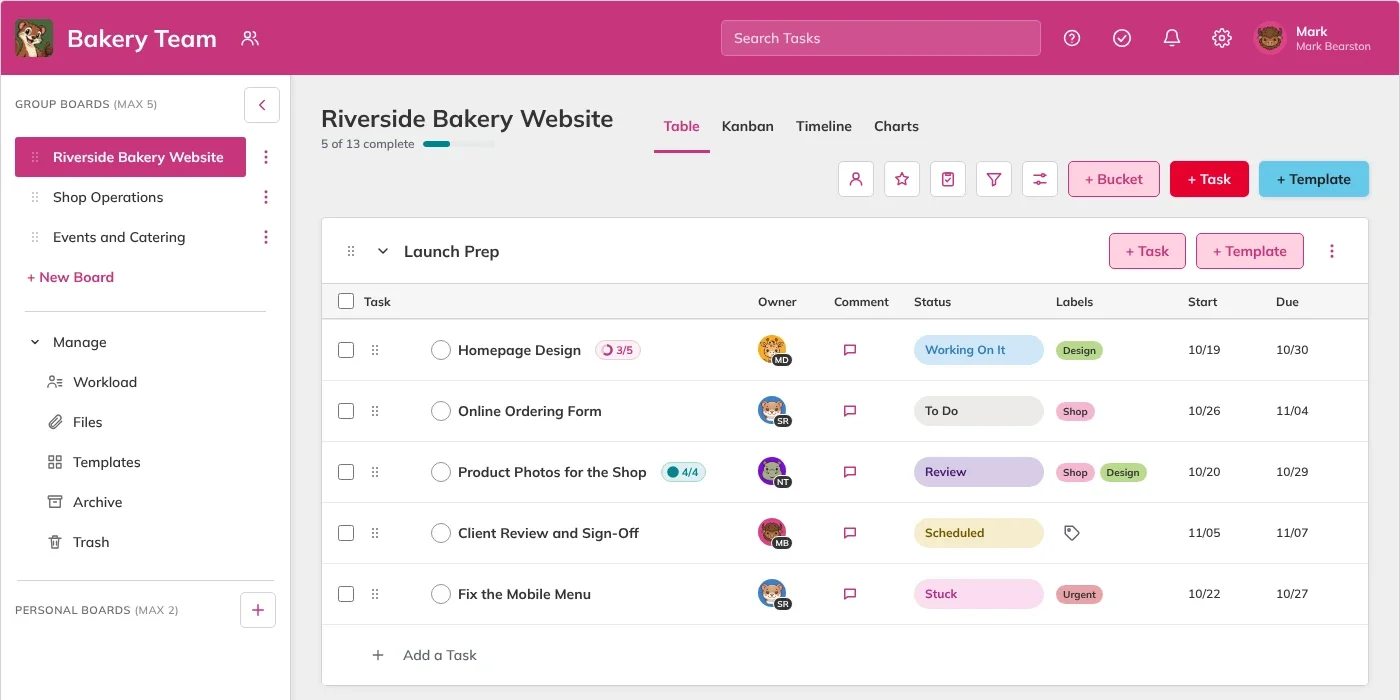
Table FREE
Every task at a glance, with owners, dates and status side by side.
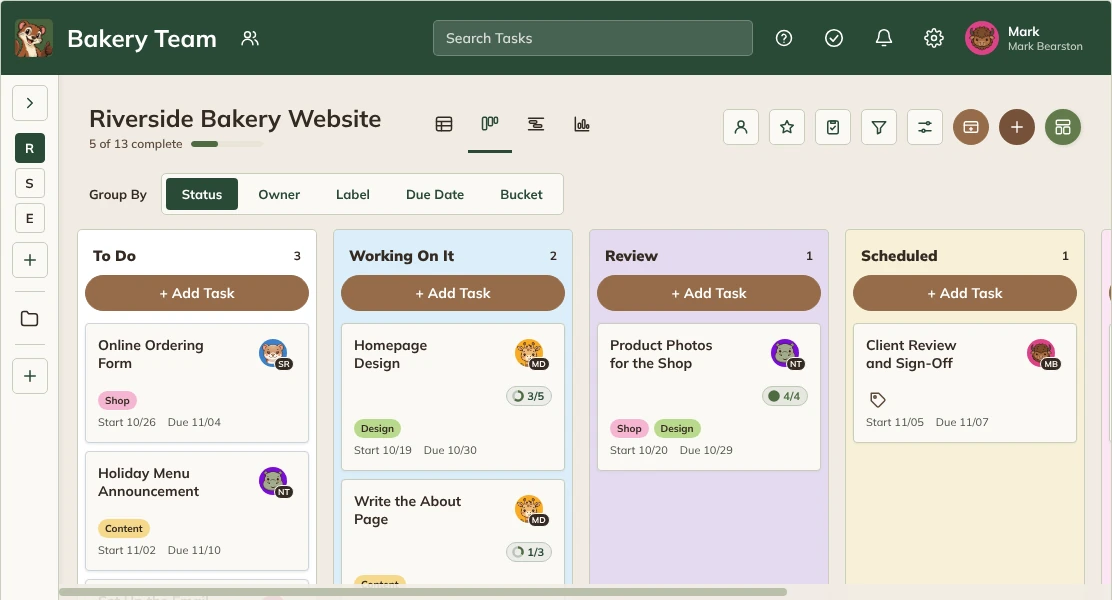
Kanban FREE
Drag cards from To Do to Complete. Pro adds grouping by Owner, Label, Due Date or Bucket.
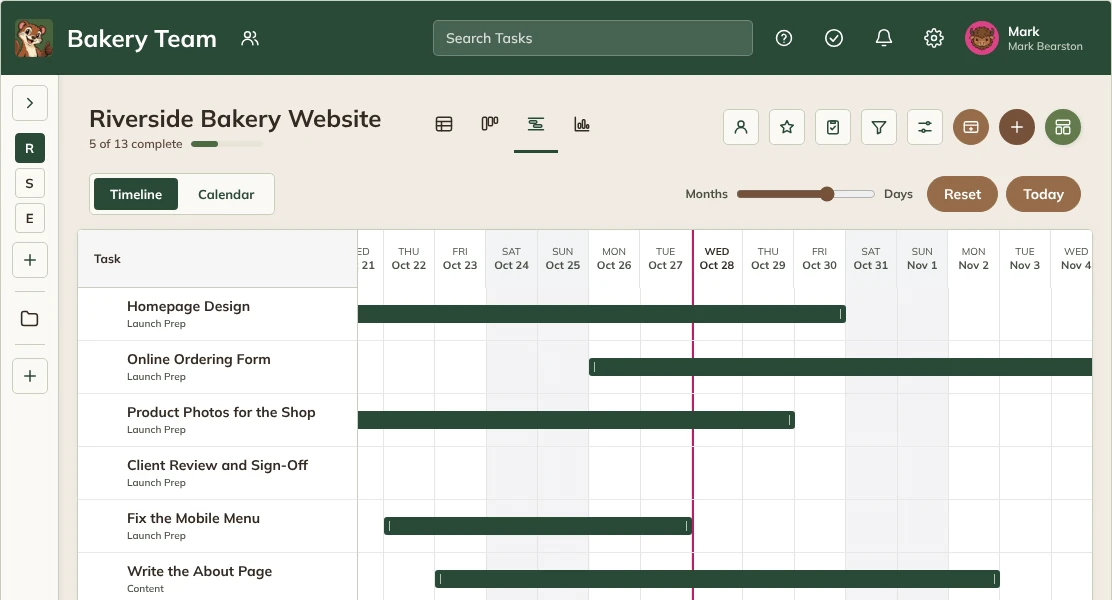
Timeline and Calendar PRO
See every task on a timeline or a monthly calendar, and spot clashes early.
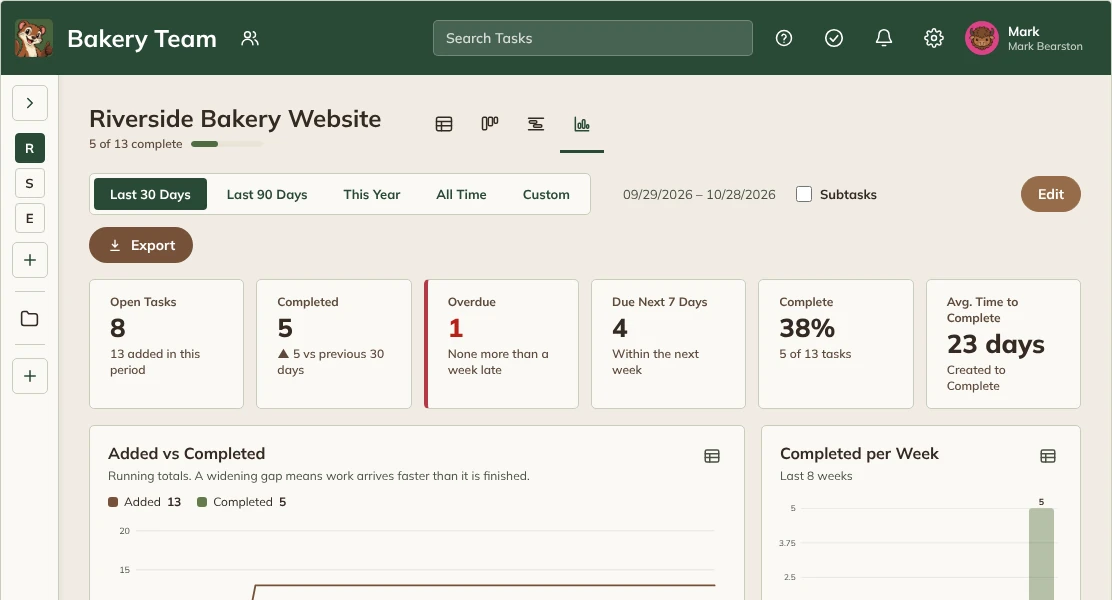
Charts FREE PRO
See progress at a glance. Summary tiles are free; the full dashboard and PDF Export are Pro.
PRO
Easily Make It Yours
Theme Studio comes with Pro. Each person picks a theme in their own Settings › Look, or makes their own with your brand colors, fonts, button shapes and a background picture. Administrators add themes for the whole team and give each Workspace its own logo. Drag the handle to compare.
Start Free.
Grow Into Pro.

FREE
Free, Forever
Everything a small team needs to run its work.
- One Workspace, up to 10 Group Boards, plus Personal Boards
- Table and Kanban views, with summary Charts
- Subtasks, checklists, labels and comments with @mentions
- Follow tasks to hear about comments and changes
- Export a backup any time
- Phone-friendly layout and Dark Mode
PRO
From $79 a Year
or $249 once (lifetime) · 14-day free trial
For teams that plan, report and standardize.
- Everything in Free, plus multiple Workspaces
- Timeline, Calendar and Workload
- Recurring Tasks and Templates
- Full Charts dashboard and PDF Export
- Review & Sign-Off and custom statuses
- Theme Studio, your own branding and priority email support
How WeaselWorks Compares
An honest look at WeaselWorks next to the big names. We don't do everything they do, but we cover what most small teams use every day, at a flat price that never grows with your team.
| Compared on their entry plans | WeaselWorksFree | monday.comBasic | AsanaStarter | TrelloStandard |
|---|---|---|---|---|
| Cost for a team of 10*Per year, billed yearly | $0plus your website, about $130 a year | $1,080$9 per person a month | $1,319$10.99 per person a month | $600$5 per person a month |
| Price stays the same as your team grows | ✓ | Per person | Per person | Per person |
| Your work stays on your own website | ✓ | Their servers | Their servers | Their servers |
| Free plan for a whole team | No user limit (tested with 500 people) | Up to 2 people | Up to 2 people | Up to 10 people |
| Table and Kanban boards | ✓ | ✓ | ✓ | ✓ |
| Subtasks, checklists and @mentions | ✓ | ✓ | ✓ | ✓ |
| Timeline and calendar | PRO | Higher plan | ✓ | Higher plan |
| File attachments | ✓ (on your own website) | ✓ | ✓ | ✓ |
| Automations, guest access, custom fields and connections | ✕ | Higher plan | ✓ | ✓ |
| On your phone | Browser view | App | App | App |
Coming from monday.com? Bring your boards with you, free. See How ›
*Prices from each company’s website, October 2026 (monday.com Basic, Asana Starter and Trello Standard, billed yearly). “Higher plan” means it costs more than shown. Hosting at a typical regular price. No phone app on purpose: your tasks still open in your phone’s browser. monday.com, Asana and Trello are trademarks of their owners; WeaselWorks isn’t affiliated with them.
Want simple shared boards your team owns, at a price that never grows? WeaselWorks was made for you.
WeaselWorks started as a small project and grew into something much bigger. I hope it gives teams real value: a simpler, fairer choice than the expensive, clunky tools the big players sell.
Tim de Taranto, Creator of WeaselWorks (yes, it's just me)
Built to Work Alongside
Your Favorite Plugins
WeaselWorks runs on its own pages, so it's built to stay out of the way of your theme and plugins. Here are a few favorites.
Themes and Builders
- Divi
- Elementor
- Astra
- GeneratePress
- WPBakery Page Builder
- WordPress default themes
Members and Security
- Ultimate Member
- Wordfence
- WP Cerber Security
- Solid Security
- Limit Login Attempts
- WPS Hide Login
Everyday Plugins
- WP Mail SMTP
- LiteSpeed Cache
- Rank Math SEO
- All in One SEO
- WooCommerce
- Contact Form 7
Tested on real sites with Divi, Elementor, WPBakery, Ultimate Member, WP Cerber, WooCommerce and many more.
Questions, Answered
The things people ask before they install WeaselWorks.

Do I need WordPress?
Yes. WeaselWorks runs inside a WordPress website you control. If you don't have one yet, our step-by-step guide gets you set up in about 20 minutes, with no code.
Does it have to go on my company website?
No. WeaselWorks can run on its own private WordPress site, set up just for your team. Your company website stays exactly as it is, and it doesn't matter who runs it or what it's built with. The private site's address opens straight to the WeaselWorks sign-in, so only your team sees anything. Setting one up takes about 20 minutes. Setting Up a Private Site ›
Is WeaselWorks really free?
Yes. WeaselWorks Free isn't a trial and never runs out. It's complete for one team: one Workspace, up to 10 Group Boards plus Personal Boards, Table and Kanban views with summary Charts, and backups you can export any time. Pro adds more on top when you need it.
Do you charge per person?
No, never. Add your whole team and everyone who joins later. Pro is priced per site, so a bigger team never means a bigger bill.
Can I attach files to tasks?
Yes, in WeaselWorks Free. Drop files on a task on a shared Board, paste a screenshot, or add them to the task's description or a comment, then click a file to see it without leaving WeaselWorks. Pictures, PDFs, Word, Excel, PowerPoint, text and CSV files all work. Files are stored on your own website and open only in WeaselWorks, for signed-in people who can see the task. Free allows files up to 10 MB and 1 GB per Workspace; Pro allows up to 25 MB and 10 GB. The site owner can set lower limits.
Are my files private?
Yes. Files open only inside WeaselWorks, for signed-in people who can see the task. They're stored in a hidden folder on your own website, not in the Media Library, and each file has a random address that can't be guessed. On most hosts, file links are also blocked automatically. On a few (such as WP Engine or Kinsta), WeaselWorks shows you a five-minute step to turn that on. Keeping Attached Files Private ›
Where is my data stored?
On your own website. Tasks, comments and history are in your WordPress database, and files are in a hidden folder, never in the public Media Library. WeaselWorks doesn't send any of it to an outside service, and you can export a backup any time, files included, and use it to move WeaselWorks to a new site.
Will it work with my theme and other plugins?
Yes. WeaselWorks runs on its own pages and keeps its styles to itself, so it works with most themes, including page builders like Divi. It leaves your login, theme and other plugins alone.
Who can use it?
Signed-in WordPress users you add to a Workspace. Administrators choose which WordPress roles can be added, and each Workspace has Leads and Members.
Does it work on phones?
Yes. WeaselWorks has a layout made for small screens, so your team can update tasks wherever they are.
What does Pro add?
Multiple Workspaces, Timeline, Calendar and Workload, Recurring Tasks and Templates, the full Charts dashboard and PDF Export, Review & Sign-Off and custom statuses, Theme Studio for your own themes and branding, bigger file limits, and priority email support. Pro is a separate add-on: keep WeaselWorks installed and add Pro on top.
Do I need to install Theme Studio?
No. Theme Studio is built into WeaselWorks Pro, so there's nothing extra to install. If you still have the old Theme Studio plugin, WeaselWorks asks you to delete it, and your themes and pictures carry over.
Can I move my boards from monday.com?
Yes. In monday.com, export the board to Excel. Then in WordPress, go to WeaselWorks › Import / Export and choose Import From Another App. You'll see everything in the file and choose what comes in, and who each person is, before anything changes. Groups become buckets, items become tasks and subitems become subtasks, with their owners, statuses, dates, labels and comments. It's included in WeaselWorks Free. Moving From monday.com ›
What happens when my Pro license ends?
Pro keeps working. When a yearly license ends, only updates and priority email support stop, and renewing turns them back on. A lifetime license never runs out. Removing Pro never deletes your work. See Pro pricing.
What happens if I deactivate it?
Your work stays safely in your database. Turn WeaselWorks back on and everything is right where you left it.
What do I need to run it?
WordPress 6.4 or newer (6.5 or newer for WeaselWorks Pro) and PHP 8.0 or newer. That's it: no outside accounts or services.

Give Your Team
a Better Burrow
Install it on your WordPress site in a few minutes. Your first Workspace comes with a starter Board, so there's something to click right away.
Free forever. Works with the WordPress site you already have.
No Per-Person Fees
Your Data Stays at Home
Theme Friendly
Free Forever Plan