

Already using monday.com? You don't have to start over. Export a board from monday.com, upload it to WeaselWorks, choose what comes across, and your team carries on where it left off. It's free, and it takes a few minutes per board.
monday.com Names in WeaselWorks
| In monday.com | In WeaselWorks | Good to know |
|---|---|---|
| Workspace | Workspace | Your team's space |
| Main board | Group Board | Shared with everyone |
| Private board | Personal Board | Only you can see it |
| Group | Bucket | A stage or section |
| Item | Task | |
| Subitem | Subtask | |
| People column | Owner | One per task; extras go in the description |
| Status column | Status | You choose how each one maps |
| Timeline column | Start and Due Date | |
| Tags or labels | Labels | Up to 8 per board |
| Updates | Comments | Tick “Include updates” when exporting |
| Files | Links | Each links back to monday.com |
| Done items | Completed bucket | Reopen any time |
Every import arrives as a shared Group Board.
Before You Start
- WeaselWorks is installed on your WordPress site and has a Workspace. New here? Start with Installing WeaselWorks.
- You're a WordPress administrator.
- Optional: add your team to your site first, so their tasks are matched straight away. You can also do it later.
How to Move From monday.com in 4 Steps
1 Export the Board From monday.com
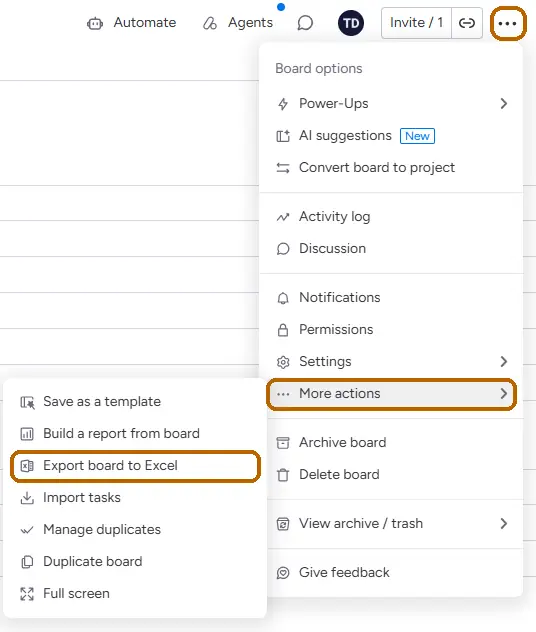
Open the board in monday.com and choose the three dots at the top right of the board › More actions › Export board to Excel. If it offers Include updates, tick it to bring the comments. Then click Export.
monday.com shows the same steps in its own guide, Export a board to Excel.
2 Upload It in WeaselWorks
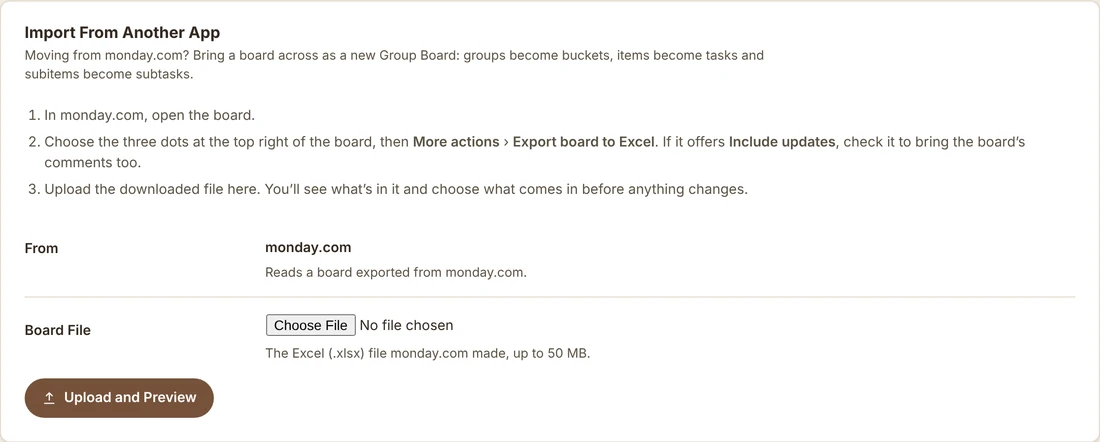
In WordPress, go to WeaselWorks › Import / Export and find Import From Another App. Choose the Excel (.xlsx) file monday.com gave you, then click Upload and Preview. A CSV file laid out the same way works too.
3 Choose What Comes In
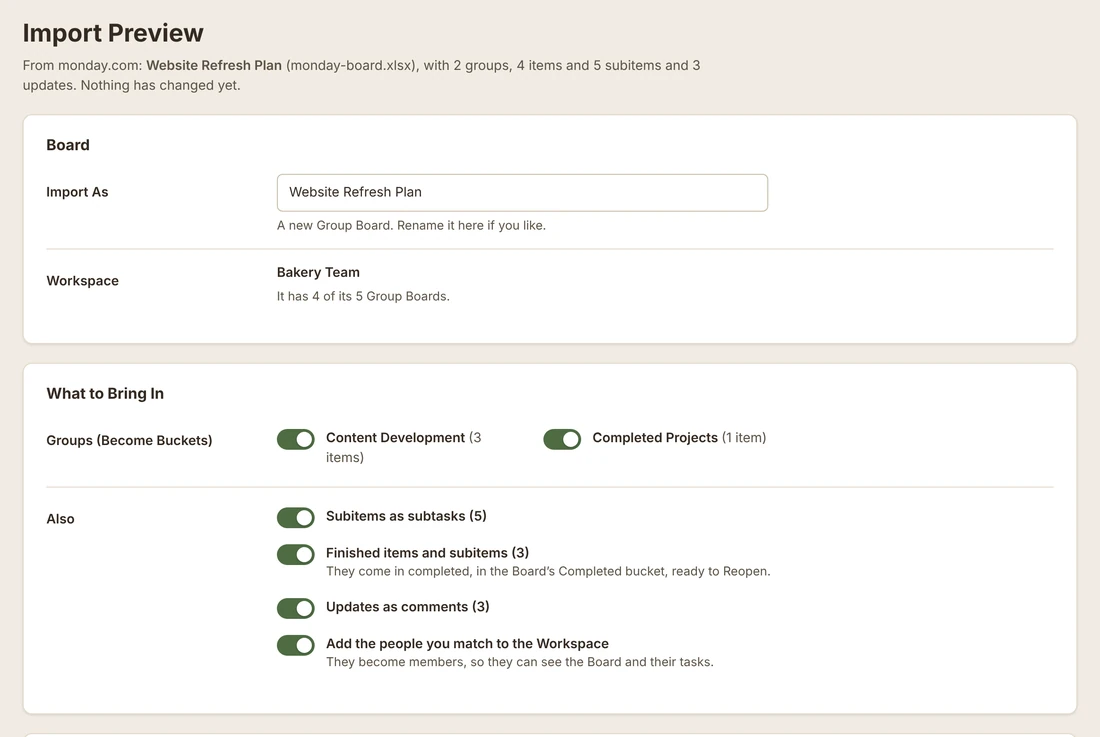
Nothing changes until you click Import. The preview shows what's in the file and lets you:
- Rename the Board and pick its Workspace.
- Pick which groups come in, and whether to bring subitems, finished work and comments.
- Choose what each column becomes, such as Owner, Status, Due Date, Labels or Links. Each one starts with a suggestion, which is usually right.
- Match each of your monday.com status words to a WeaselWorks status.
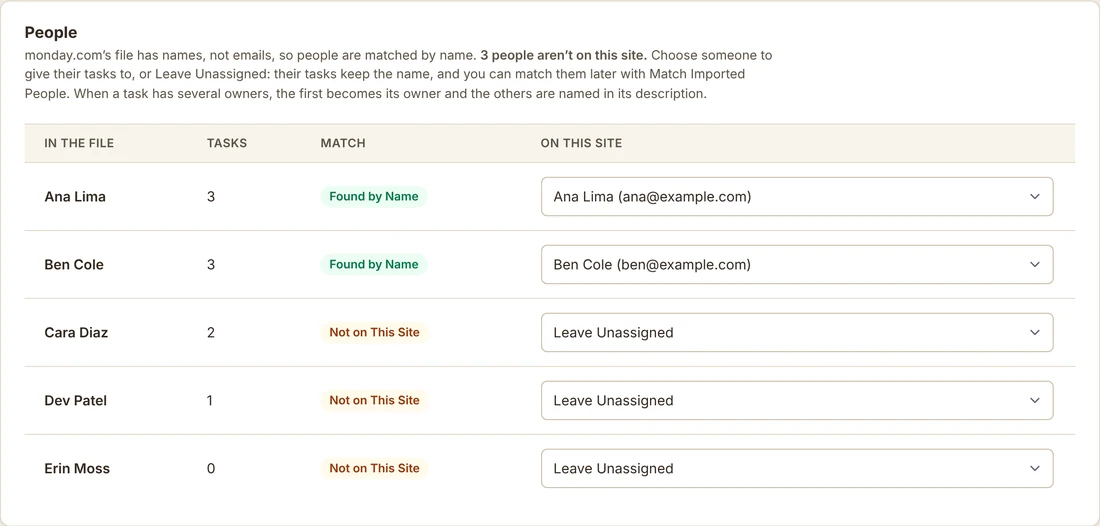
- Say who each person is on your site. People are matched by name, because monday.com's file has no email addresses.
4 Import and Open the Board
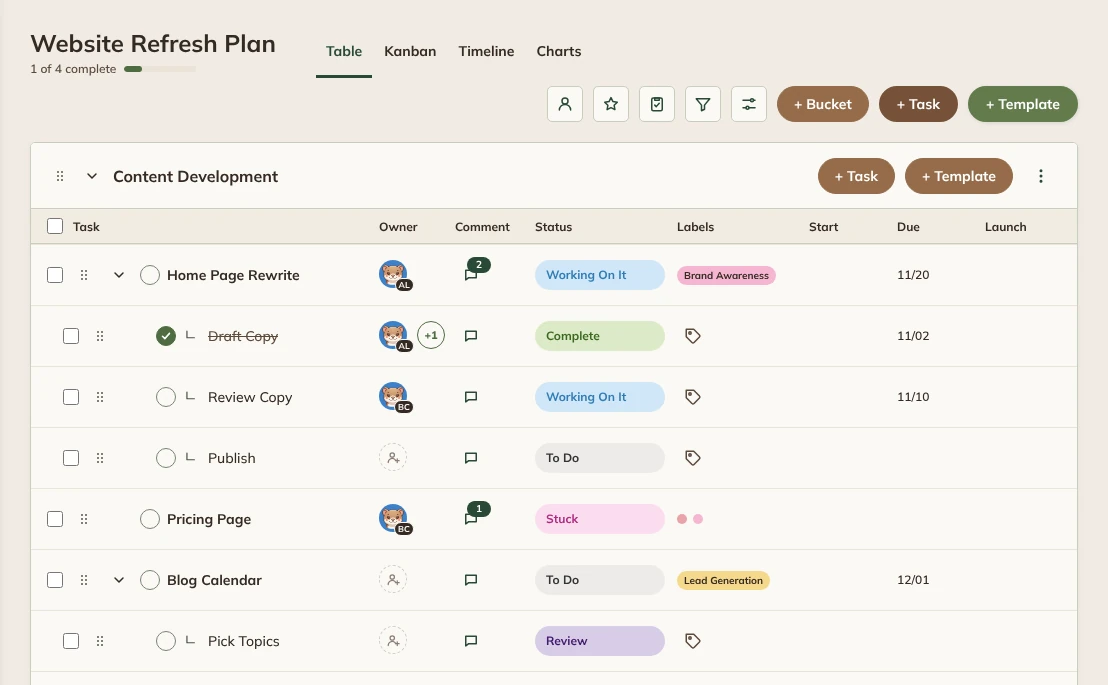
Click Import, then open your new Board. Groups become buckets, items become tasks and subitems become subtasks, with their owners, statuses, dates, labels and comments. Finished work comes in completed, ready to Reopen if you need it.
Tip: nothing is lost. Columns WeaselWorks has no place for are kept in each task's description as "Column: value".
People Who Join Later
If someone isn't on your site yet, their tasks come in unassigned but keep their name. Once they have an account, use Match Imported People on the same Import / Export screen. It hands them all their tasks in one go and adds them to the Workspace.
Good to Know
- One board comes in per import. To bring several, import them one at a time.
- Files come across as links back to monday.com, not as uploaded files. You can attach new files to tasks in WeaselWorks.
- Automations, formulas, dashboards and views don't come across.
- A task has one owner. When an item had several, the first becomes the owner and the others are named in the description.
- A Board has 8 label colors, so the 8 most used labels become labels and the rest go into the description.
- monday.com's export doesn't include comments on subitems, so only the main items' comments come across.
- WeaselWorks Free's limits still apply: one Workspace and up to 10 Group Boards.
Common Questions
Does importing change anything in monday.com?
No. WeaselWorks only reads the file you exported. Your board in monday.com stays exactly as it was.
Can I import more than one board?
Yes, one at a time. Each board becomes its own Group Board, up to your Workspace's Group Boards limit.
Is importing included in WeaselWorks Free?
Yes. Importing from monday.com is in both WeaselWorks Free and Pro. See what else each plan includes on Compare Free and Pro.
What's Next?
Once your boards are in, follow our Get Started steps to invite your team and settle in.
monday.com is a trademark of its owner. WeaselWorks isn't affiliated with monday.com.